Activation |
  
|
Activation |
|
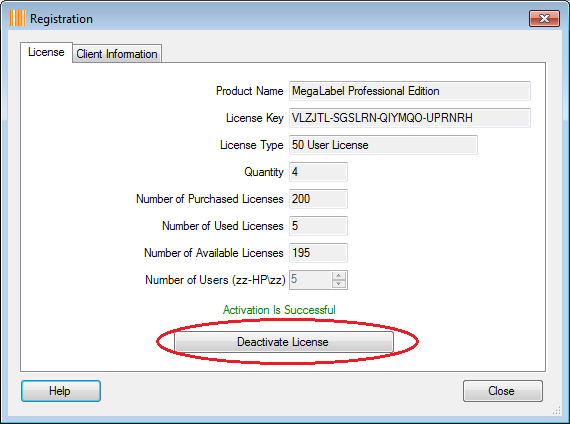
You have to use the license key to activate MegaLabel software in order to let it run in full version mode by clicking "Help" > "Manage License", an internet connection is required to check our licensing server.
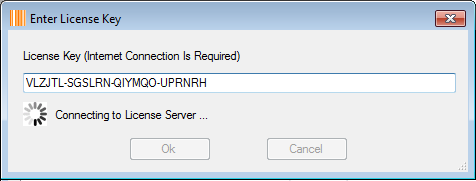
1)Once the "Enter License Key" window is fired up, enter the license key into the "License Key" text field and click the "Ok" button to connect to our licensing server to validate it.
2)If the license validation is successful, the "Registration" window will be fired up, choose how many users will use MegaLabel on current computer account, since a few users may share same computer account. In the following screen shot, computer account name is zz-hp\zz and your real computer account name will be displayed in current window.
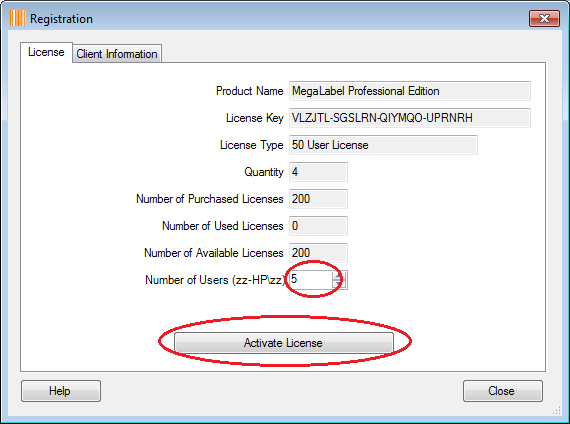
3)Click the "Activate License" button to activate the license, you may deactivate and release the license seats by clicking the "Deactivate License" button later.