Trial Version |
  
|
Trial Version |
|
1.The trial version Aztec .NET CF libraries append "MW6 Demo" to the string encoded with the Aztec format.
2.After the installation for the trial version is finished, depending on your application platform, copy corresponding Aztec .NET CF library file in VB.NET or C# demo sub folder of the destination folder (e.g. "C:\Program Files\MW6 .NET CF\Aztec\Platform_Name") to your project folder.
Platform Name |
Library Name |
Pocket PC |
MW6.AztecPC.dll |
Windows CE |
MW6.AztecCE.dll |
Smartphone |
MW6.AztecSP.dll |
3.In "Solution Explorer" for your application, right-click on "References", click on "Add Reference".
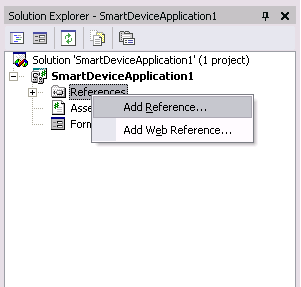
4.In "Add Reference" dialog, click on "Browse", locate Aztec .NET CF library file for your platform, click on "Open" to return to "Add Reference" dialog, click on "OK". If a message box ("The reference MW6.AztecXX.DLL may or may not be valid for the active platform...") pops up, click on "OK" and continue.
5.Add Aztec .NET CF library related code to your application.