Install Template File |
  
|
Install Template File |
|
1.Locate Microsoft Word Startup folder, which usually is "C:\Documents and Settings\<user name>\Application Data\Microsoft\Word\STARTUP" for Windows XP or "C:\Users\<user name>\AppData\Roaming\Microsoft\Word\STARTUP" for Windows Vista and above.
2.Copy MW6_Aztec_Font.dotm for 32-bit Office or MW6_Aztec_Font_x64.dotm for 64-bit Office to this folder.
3.For 32-bit Office, copy "AztecFont.dll" to the windows 32-bit system folder (e.g., "C:\winnt\system32" or "C:\windows\system32") of 32-bit OS or the windows SysWow64 folder of 64-bit OS (e.g., "C:\windows\SysWow64").
4.For 64-bit Office, copy "AztecFont_x64.dll" to the windows 32-bit system folder (e.g., "C:\windows\system32").
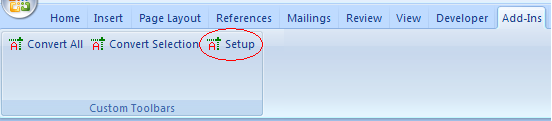
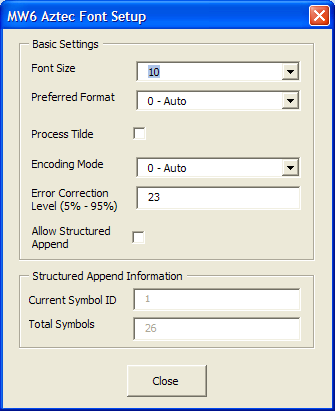
5. Click on "Add-Ins", then click on "Setup". Change the configurations for Aztec format, if you want to encode a string with non-printable characters, click on "Process Tilde" checkbox.