Install Template File |
  
|
Install Template File |
|
1.Locate the Word STARTUP folder, the STARTUP folder can be found in the following locations:
OS |
Location |
Windows Vista and above |
"C:\Users\<user name>\AppData\Roaming\Microsoft\Word\STARTUP"
|
Windows 2000/XP |
"C:\Documents and Settings\<user name>\Application Data\Microsoft\Word\STARTUP"
|
Windows NT4 |
"C:\Winnt\Profiles\<user name>\Application Data\Microsoft\Word\STARTUP"
|
Windows 95, 98, ME |
Office XP: "C:\Program Files\Microsoft Office\Office10\STARTUP"
Office 2000/97: "C:\Program Files\Microsoft Office\Office\STARTUP" |
2.Copy MW6_Aztec_Font.dot to this folder.
3.Copy "AztecFont.dll" to the windows 32-bit system folder (e.g. "C:\winnt\system32" or "C:\windows\system32").
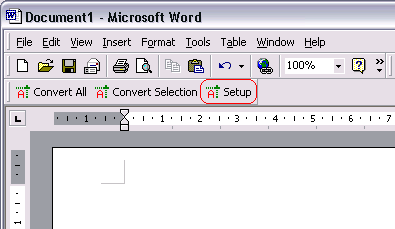
4.Open up Word, click on "Setup". If you keep getting the error message "The macro cannot be found or has been disabled because of .....", download Office 2000 or 2003 Service Pack 3 from Microsoft website and install it to fix this issue. Or simply click "Tools" > "Macro" > "Macros", select "MW6_Aztec_Font_Setup" and run it.
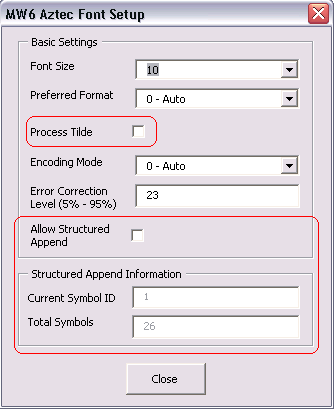
5. Change the configurations for Aztec format, if you want to encode a string with non-printable characters, click on "Process Tilde" checkbox.